In this post we are going to solve the problem “No packages exist with this id”. This problem typically occurs because we don’t have a Nuget package source properly configured in Visual Studio.
In order to solve this issue we must:
1. Go to Visual Studio (with a project opened)
2. Right click on the project and click “Manage nuget packages“
3. Click on the gear icon at the upper right:

4. Have this configuration in place:
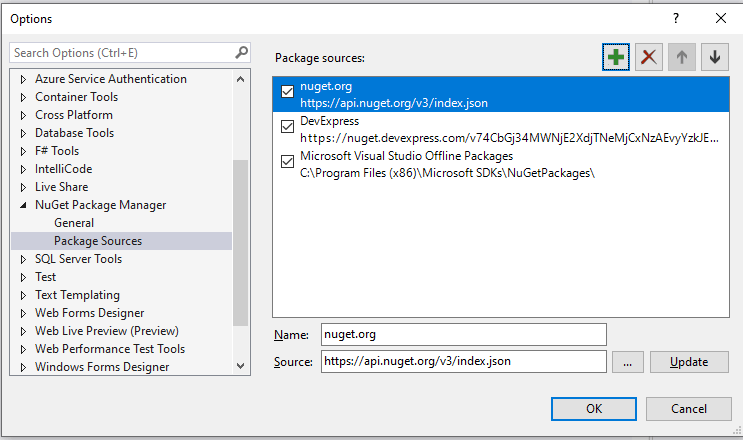
Name: nuget.org
Source: https://api.nuget.org/v3/index.json
5. Press Ok.
That should be it!
Courses
If you want to learn about C#, ASP.NET Core, Angular, React, and more good stuff, check out my Udemy courses today: https://www.felipe-gavilan.com/cursos?idioma=eng
 Felipe Gavilán
Thanks a lot gavilanch, your solution helped me out!
LikeLike